Direct TUS upload cho end user
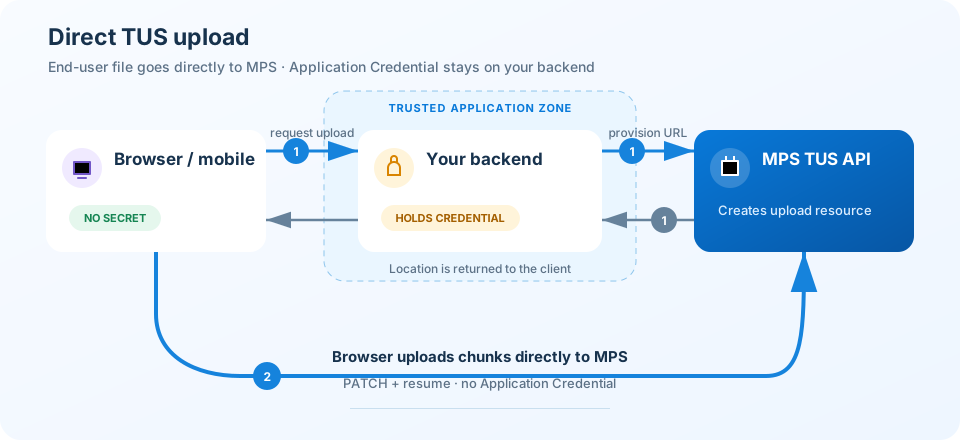
Direct TUS upload cho phép browser hoặc mobile app upload file trực tiếp tới MPS mà không nhận X-App-Credential-Id hoặc X-App-Credential-Secret. Backend chỉ dùng hai giá trị này để tạo upload URL cho client.
Khi nào dùng Direct TUS upload
Đây là phương thức được khuyến nghị khi end user upload từ browser hoặc mobile app, đặc biệt với file lớn hoặc mạng có thể gián đoạn. MPS direct upload chỉ hỗ trợ TUS resumable. Mỗi upload tối đa 20 GiB và upload session hết hạn sau 24 giờ.
Luồng hoạt động
Bước 1: Backend tạo upload URL
Client gửi kích thước và metadata của file tới endpoint backend của bạn. Backend phải xác thực end user, kiểm tra policy upload, sau đó gọi:
POST https://mps.mediacdn.vn/v1/namespaces/<namespace>/tus?direct_user=true
Request tới MPS gồm:
| Header | Mô tả |
|---|---|
Tus-Resumable |
Header do TUS client gửi; backend forward tới MPS. |
Upload-Length |
Tổng số byte của file. |
Upload-Metadata |
Metadata được encode theo chuẩn TUS. |
X-Auth-Type |
Giá trị application_credential. |
X-App-Credential-Id |
Application Credential ID, chỉ lưu trên backend. |
X-App-Credential-Secret |
Application Credential Secret, chỉ lưu trên backend. |
MPS trả HTTP 201 và header Location. Backend trả Location, Tus-Resumable và Tus-Upload-Expires cho client, nhưng không trả Application Credential.
Bước 2: Client upload trực tiếp tới MPS
Sau khi trả Location nhận được từ MPS cho client, backend của bạn hết nhiệm vụ, thư viện TUS phía client tự giao tiếp với MPS để upload file. Các request HEAD và PATCH tiếp theo đi trực tiếp từ client tới URL trong Location và không chứa Application Credential.
Ví dụ đơn giản
Ví dụ này gồm một Express route tạo upload URL và một file JavaScript chạy tus-js-client trên browser.
1. Cài dependency
npm install express dotenv tus-js-client
Tạo .env trên backend và không commit hoặc phục vụ file này như static asset:
MPS_NAMESPACE=<namespace>
MPS_CREDENTIAL_ID=<credential-id>
MPS_CREDENTIAL_SECRET=<credential-secret>
PORT=3000
2. Backend tạo upload URL
Đoạn code tập trung vào luồng tạo upload. Gắn middleware xác thực của ứng dụng vào route và validate Upload-Metadata theo policy của bạn trước khi dùng production.
server.js
require('dotenv').config();

const path = require('path');
const express = require('express');

const app = express();
const port = Number(process.env.PORT || 3000);
const maxUploadSize = 20 * 1024 * 1024 * 1024;

app.use(express.static(path.join(__dirname, 'public')));
app.use('/scripts/tus', express.static(
  path.join(__dirname, 'node_modules/tus-js-client/dist')
));

app.post('/api/create-tus-upload', async (req, res) => {
  // Production: xác thực end user trước khi tạo upload URL.
  const uploadLength = Number(req.get('Upload-Length'));
  const tusResumable = req.get('Tus-Resumable');

  if (!tusResumable || !Number.isSafeInteger(uploadLength) ||
      uploadLength < 1 || uploadLength > maxUploadSize) {
    return res.status(400).json({ error: 'Invalid upload request' });
  }

  // Production: decode, validate và rebuild metadata thay vì forward trực tiếp.
  const uploadMetadata = req.get('Upload-Metadata') || '';
  const endpoint = `https://mps.mediacdn.vn/v1/namespaces/${encodeURIComponent(process.env.MPS_NAMESPACE)}/tus?direct_user=true`;

  try {
    const upstream = await fetch(endpoint, {
      method: 'POST',
      headers: {
        'Tus-Resumable': tusResumable,
        'Upload-Length': String(uploadLength),
        'Upload-Metadata': uploadMetadata,
        'X-Auth-Type': 'application_credential',
        'X-App-Credential-Id': process.env.MPS_CREDENTIAL_ID,
        'X-App-Credential-Secret': process.env.MPS_CREDENTIAL_SECRET
      }
    });

    for (const name of ['Location', 'Tus-Resumable', 'Tus-Upload-Expires']) {
      const value = upstream.headers.get(name);
      if (value) res.setHeader(name, value);
    }

    res.status(upstream.status).send(await upstream.text());
  } catch (error) {
    res.status(502).json({ error: 'Cannot create MPS upload' });
  }
});

app.listen(port, () => console.log(`Open http://localhost:${port}`));
3. Browser upload file
public/index.html
<input id="fileInput" type="file">
<button id="startBtn">Start</button>
<button id="pauseBtn">Pause</button>
<button id="resumeBtn">Resume</button>
<progress id="progress" value="0" max="100"></progress>
<pre id="status"></pre>

<script src="/scripts/tus/tus.min.js"></script>
<script src="/app.js"></script>
public/app.js
let upload;
const fileInput = document.getElementById('fileInput');
const progress = document.getElementById('progress');
const status = document.getElementById('status');

async function startUpload() {
  const file = fileInput.files[0];
  if (!file) return;

  upload = new tus.Upload(file, {
    endpoint: '/api/create-tus-upload',
    chunkSize: 10 * 1024 * 1024,
    retryDelays: [0, 3000, 5000, 10000],
    removeFingerprintOnSuccess: true,
    metadata: {
      file_path: 'videos/intro.mp4',
      display_name: file.name,
      video_profile_ids: '360,480,720',
      client_reference: 'customer-record-42',
      video_encryption: 'false',
      default_thumb_timepct: '0.25'
    },
    onProgress(uploaded, total) {
      progress.value = (uploaded / total) * 100;
      status.textContent = `${progress.value.toFixed(2)}%`;
    },
    onError(error) {
      status.textContent = `Upload failed: ${error}`;
    },
    onSuccess() {
      status.textContent = 'Binary upload completed';
    }
  });

  const previous = await upload.findPreviousUploads();
  if (previous.length) upload.resumeFromPreviousUpload(previous[0]);
  upload.start();
}

document.getElementById('startBtn').onclick = startUpload;
document.getElementById('pauseBtn').onclick = () => upload && upload.abort();
document.getElementById('resumeBtn').onclick = () => upload && upload.start();
Chạy node server.js, sau đó mở http://localhost:3000. tus-js-client gọi backend một lần để tạo upload URL rồi tự chuyển sang Location của MPS.
Metadata được hỗ trợ
Upload-Metadata gồm các cặp key base64-value, phân tách bằng dấu phẩy. tus-js-client tự encode object metadata trong ví dụ trên.
| Field | Mô tả |
|---|---|
file_path |
Path tương đối của file trong namespace. |
display_name |
Tên hiển thị của file. |
video_profile_ids |
Danh sách profile H.264 đang bật trong namespace, phân tách bằng dấu phẩy. |
client_reference |
Mã tham chiếu của bạn, tối đa 64 ký tự. |
video_encryption |
true hoặc false; bỏ field để dùng cấu hình DRM của namespace. |
default_thumb_timepct |
Vị trí thumbnail từ 0.0 đến 1.0. |
max_upload_size |
Policy giới hạn do backend inject; không nhận trực tiếp từ end user. |
Theo dõi trạng thái
onProgresshiển thị tiến độ truyền binary.- Pause gọi
abort()nhưng không xóa upload session; resume gọistart()và TUS kiểm tra offset hiện tại. findPreviousUploads()cho phép tiếp tục sau khi refresh browser nếu end user chọn lại cùng file.onSuccesschỉ xác nhận binary đã upload xong; video có thể vẫn đang transcode.
Dùng API liệt kê file
với client_reference để kiểm tra trạng thái xử lý, thumbnail và playback.
Yêu cầu production
- Bảo vệ endpoint tạo upload bằng session, JWT hoặc middleware xác thực của ứng dụng.
- Validate dung lượng,
file_path,client_reference, profile, encryption và thumbnail; không forward metadata chưa kiểm tra. - Bind namespace và path theo tenant đã xác thực; áp dụng rate limit và HTTPS.
- Lưu cả
X-App-Credential-IdvàX-App-Credential-Secrettrong secret manager; không trả hoặc log hai giá trị này. - Chỉ cho phép CORS từ origin ứng dụng cần upload trực tiếp.
- Nếu session hết hạn hoặc trả
404, tạo upload mới. Với offset conflict409, dừng upload trùng và để TUS kiểm tra lại offset.